
How reliably can AI assist in document extraction? Part 1.
May 14, 2026
Intro
A subject that has been coming up again recently in my network is reliable data extraction from documents. I've been in IT long enough to have been involved with this subject on multiple occasions using different approaches. From having to maintain nightmarish regex expressions to working with consultants that developed templates using a proprietary extraction SDK or RPA solutions. I haven't touched this subject for a while now, but I remember all of these solutions had similar issues.
The solution was very likely to break when the format changes or when the data in a field didn't exactly follow a pattern. And breaking changes almost certainly meant extra development or consultancy costs. For SME customers these solutions ended up being high-maintenance with minimum flexibility.
Given the recurrence of the subject I wondered:
How reliably can an LLM based system for document extraction reduce the need for human intervention when the template changes?
I'm going to try and answer this question in a series of posts.
The use case: cross referencing packing lists
A medium size e-commerce business wants to automate parts of their three-way matching process. This means cross-referencing the invoice with its corresponding purchase order and goods receipt to make sure all details match. In short: Did we get what we ordered and does the invoice match reality?
I’m going to focus exclusively on extracting packing list data and structuring it for cross-referencing. In our case, after the incoming goods have been physically checked against the packing list, the document is fed into a scanner for processing downstream. Which will lead to an automated workflow that essentially generates the goods receipt.
To make things interesting, I’ve set the following requirements for a viable solution:
- Changes in document layout must be handled automatically.
- It must support multiple pages per document.
- It must handle fuzzy input errors. For example a vendor accidentally swapping the SKU and Description columns.
- It should be able to run in a self-hosted environment.*
Before diving into the technical bits I created some testdata. I'm the owner of ATE Commerce and I work with two vendors Stark Industries Ltd and ACME Corp Europe. Each vendor uses a different packing list template and has a different address format. I worked with the following tests:
- 1 page packing list for ACME Corp Europe
- 2 page packing list for ACME Corp Europe
- 2 page packing list for ACME with some errors
- 2 page packing list for Stark Industries Ltd
I filled out the templates, printed them out and scanned them back to PDF files.
* I'm aware that the latest and greatest AI vision models can probably one-shot this with 95% accuracy. But not all businesses want or can send their documents to an external AI service for further processing. And I'm curious to find out what the options are in such cases.
AI document extraction
The first step in this series is making sure that the data I'm going to extract has all the important information I need in the best possible quality. My desk research quickly led me to a project called docling. And I got it recommended to me by someone in my network which was all the more reason to give it a try!
Docling is an open source Python library aimed at simplifying document processing. It makes use of specialized AI models for layout analysis and structure recognition. Users can build their own document processing pipelines that transform PDF documents to a docling document format that can be exported to many formats like markdown and json. This can then be ingested and processed by AI and agentic workflows. And most of this can be done on my 4 year old MacBook. No expensive GPU required!
The docling documentation contains nice examples on how to use it. A basic conversion, adapted to one of my template pdf's looks like this:
from pathlib import Path

from docling.document_converter import DocumentConverter

data_folder = Path(__file__).parent / "assets"
source = data_folder / "po-33959-singlepage-ups-300dpi.pdf"

converter = DocumentConverter()
result = converter.convert(source)

# Print Markdown to stdout.
print(result.document.export_to_markdown())
Source: https://docling-project.github.io/docling/examples/minimal/
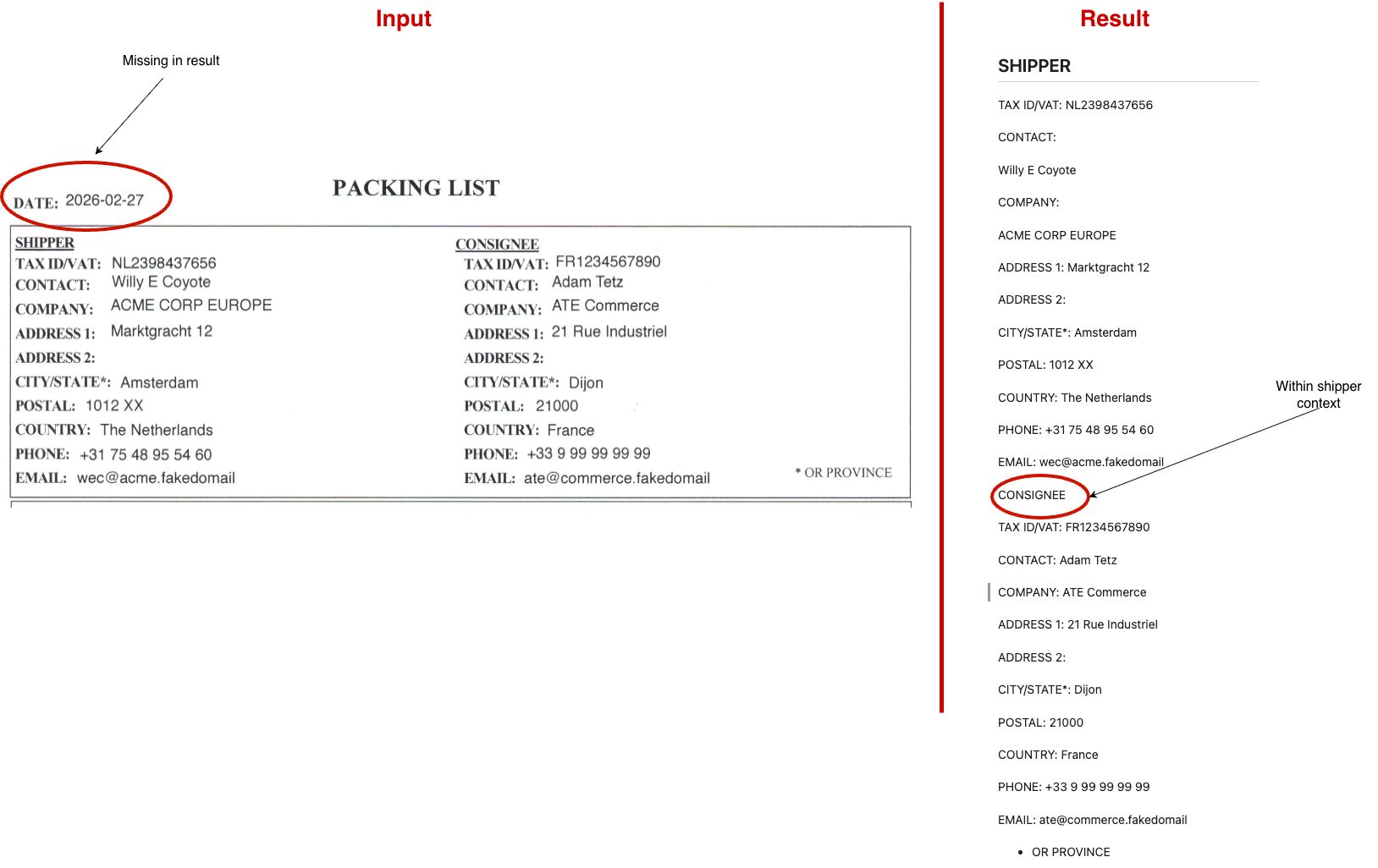
And straight off the bat it produced a result that was quite good! Nearly all the data was read and processed nicely. It missed the date and the shipper and consignee information got merged into 1 chapter.
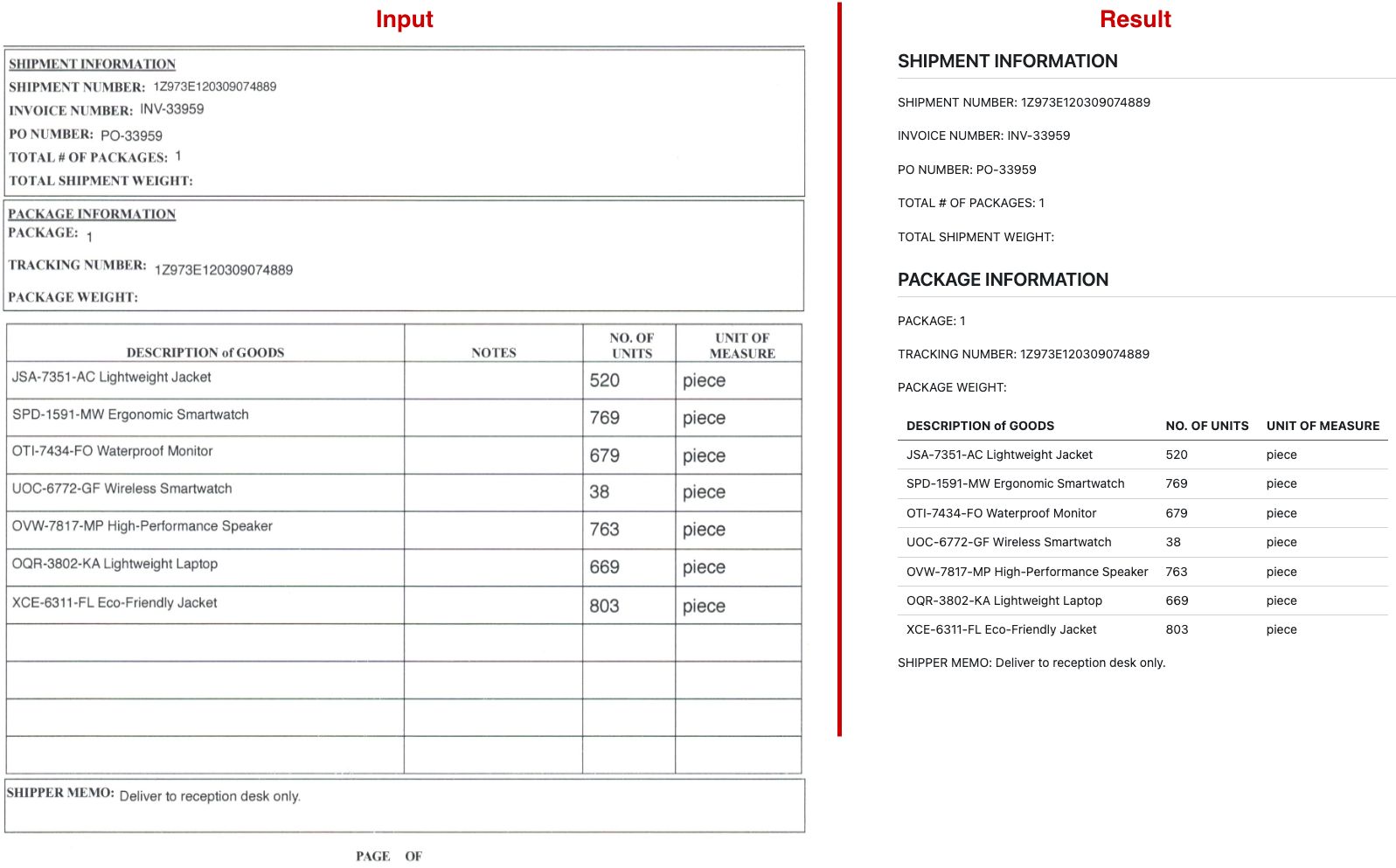
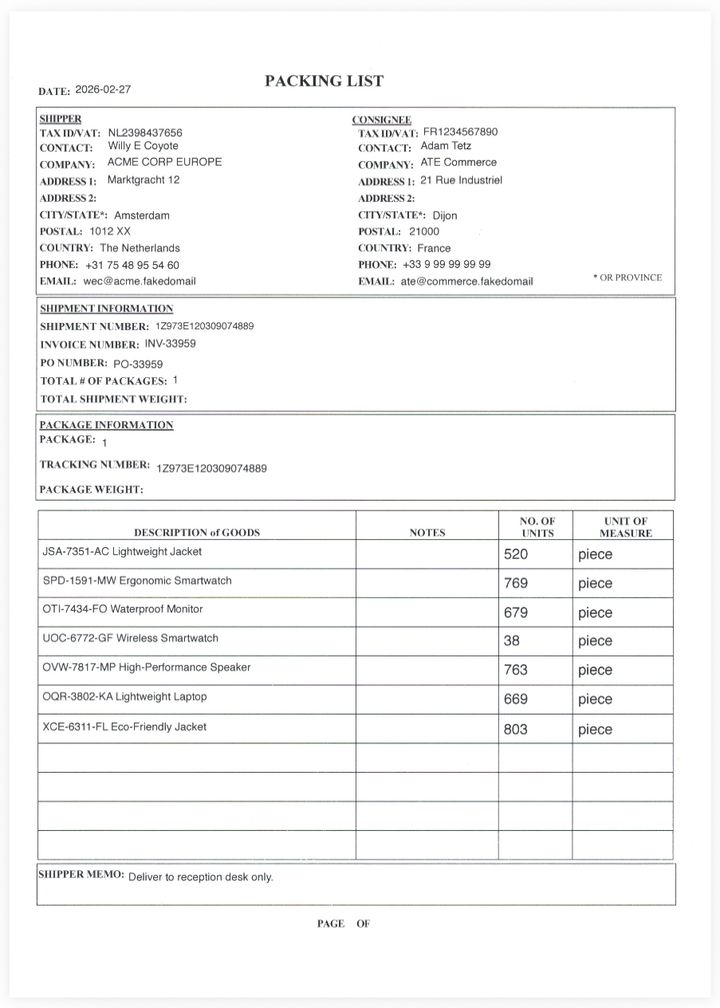
The quality remained the same when I tested out the same template with multiple pages.
But the second PDF template turned out to be less successful.
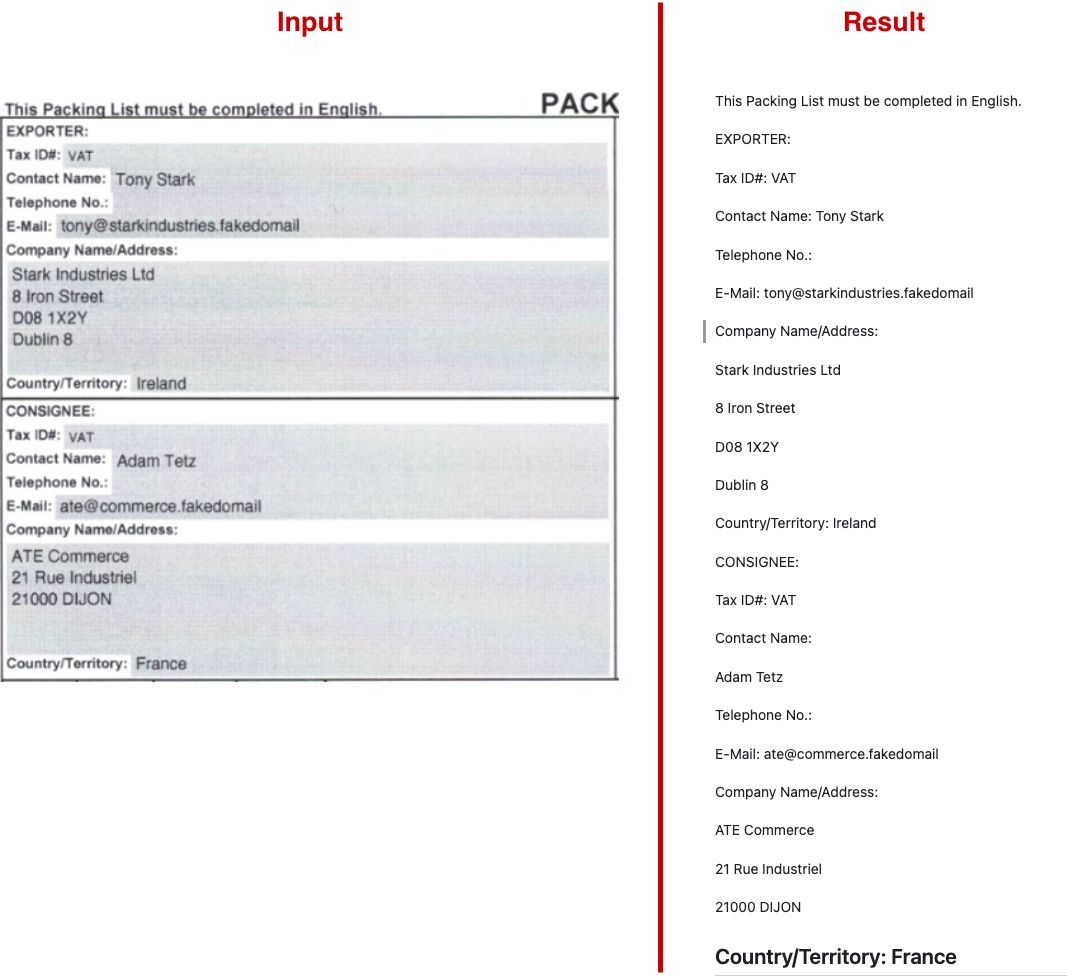
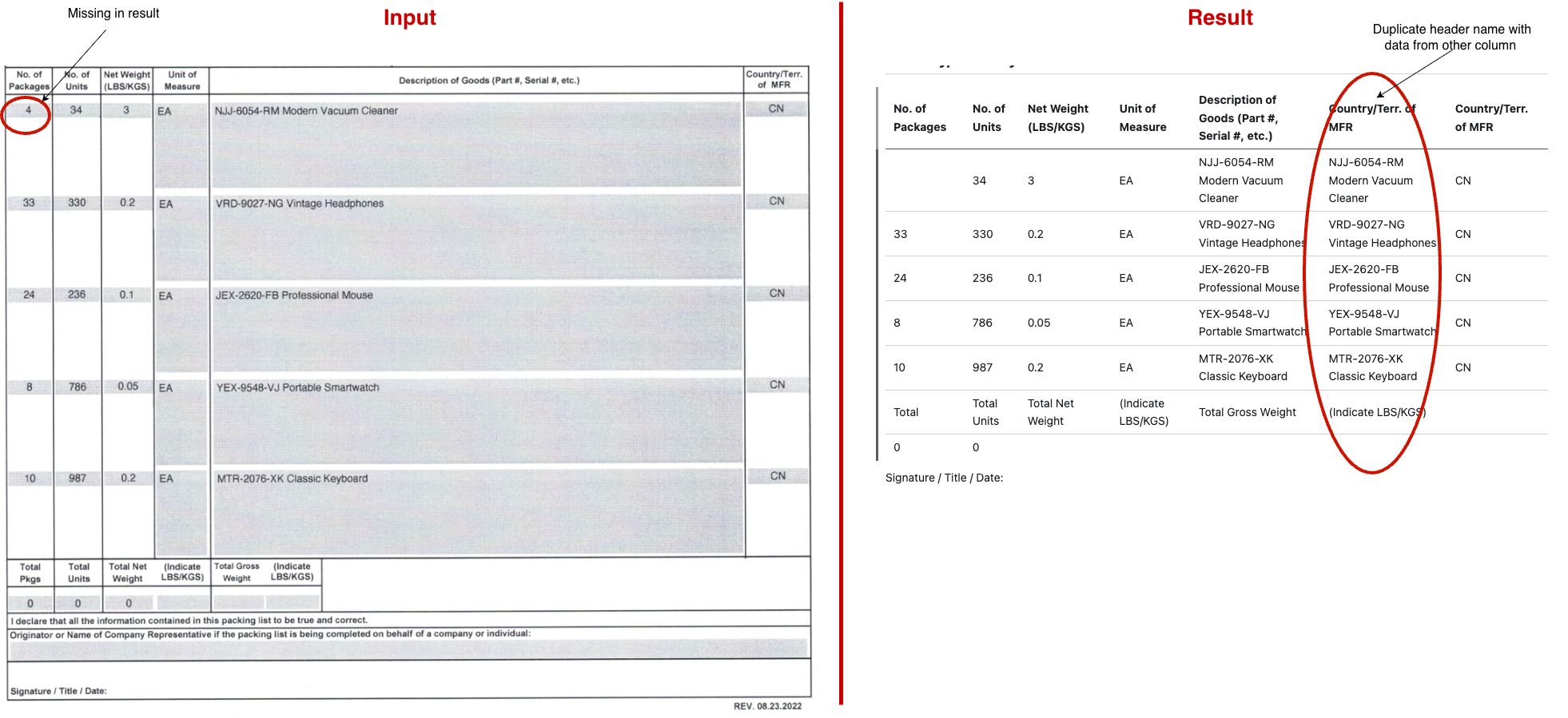
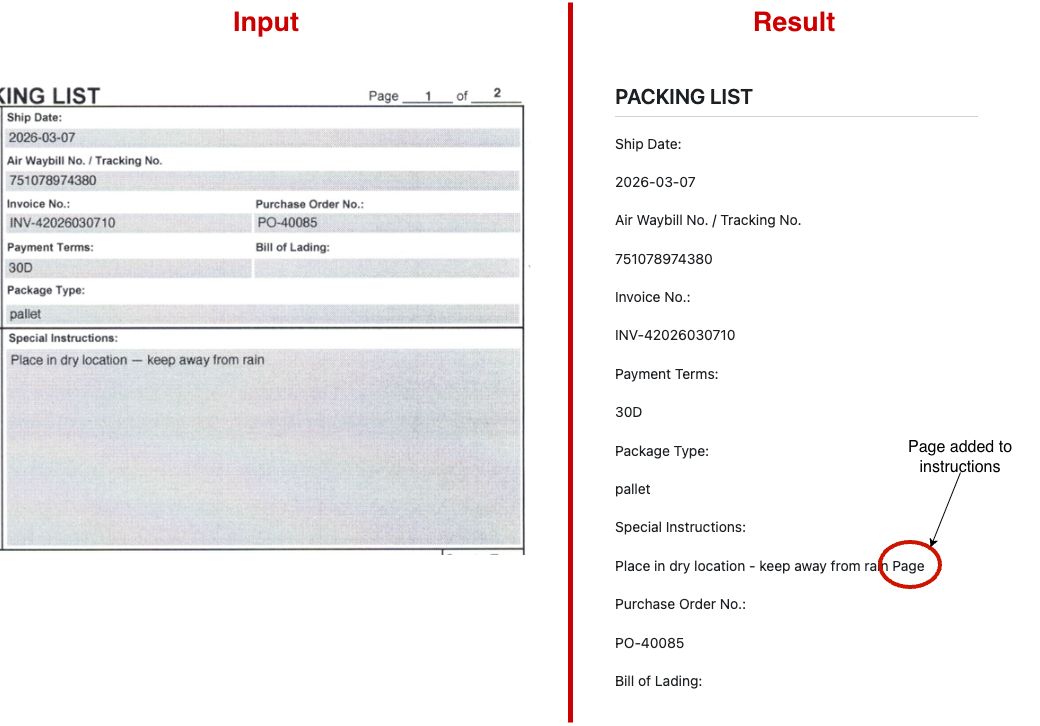
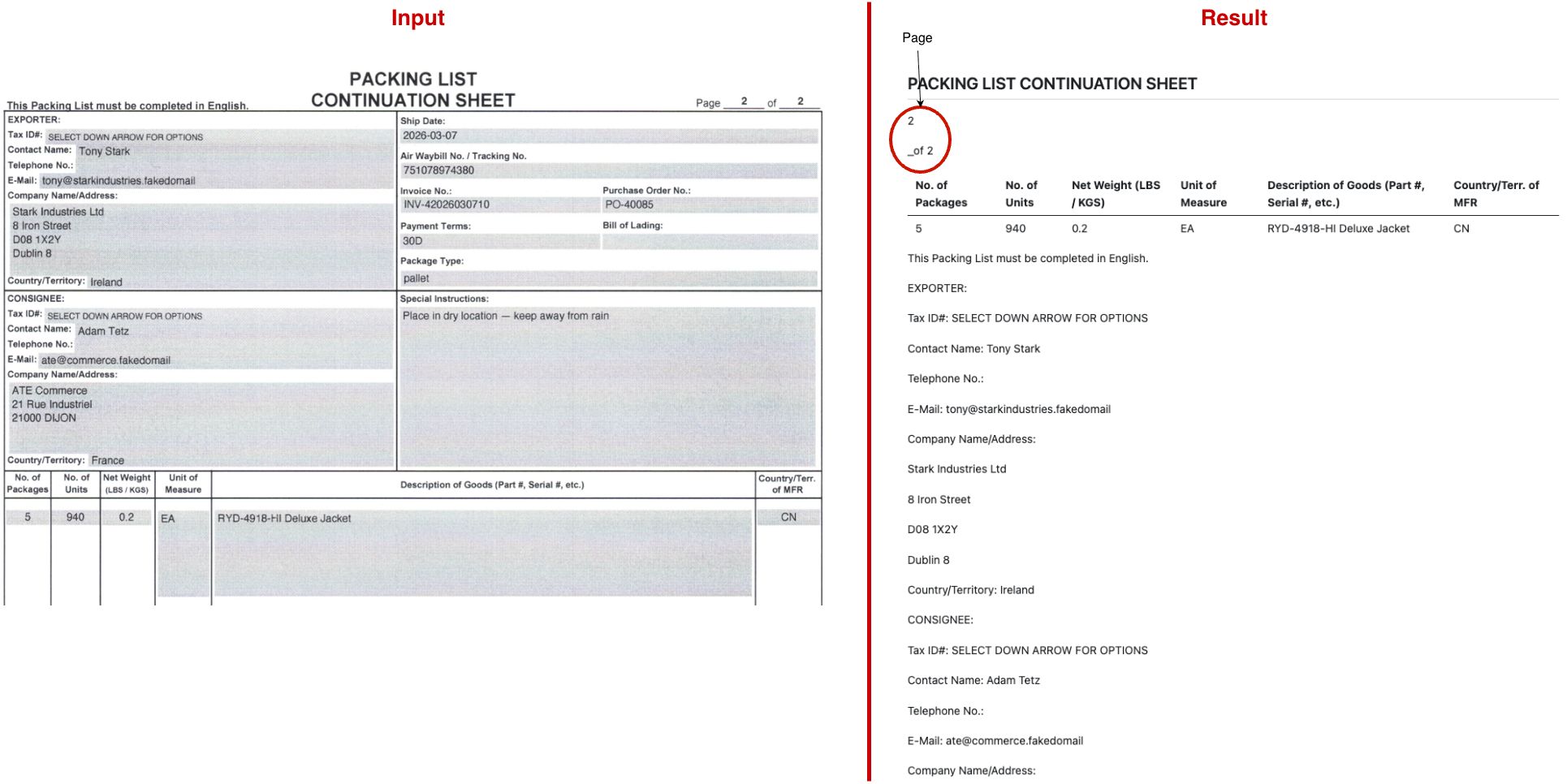
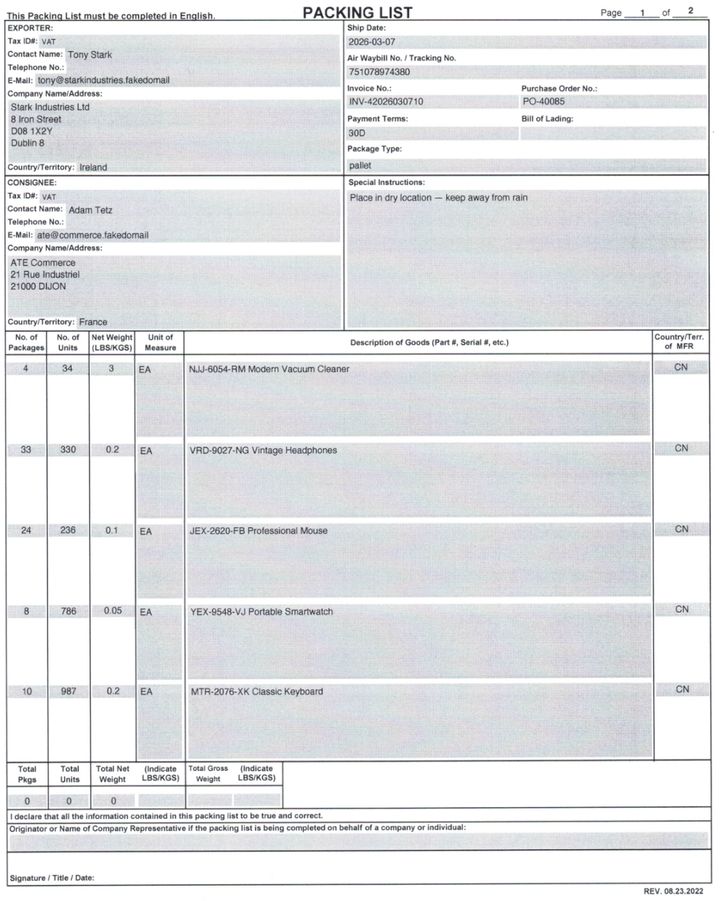
The biggest issues being that I'm missing the no. of packages for the first row and that the goods description is duplicated to country column. At the same time, this is still not bad for the defaults. And this data could still be used to pre-fill and verify further downstream in a data entry/validation phase.
My second template looks a bit more difficult and has some nested/merged cells. So I suspect it had something to do with my layout. Thankfully docling generates a confidence score in the result that contains information on how well the conversion was performed. I can use this to better understand the areas of improvement.
I extended my code with this snippet:
...
result = converter.convert(source)

confidence = result.confidence
print(f"Layout score: {confidence.layout_score}")
print(f"OCR score: {confidence.ocr_score}")
print(f"Mean grade: {confidence.mean_grade}")
print(f"Low grade: {confidence.low_grade}")

# Print Markdown to stdout.
...layout_score: indicates the overall quality of document element recognitionocr_score: indicates the quality of OCR-extracted content
Grades provide overall document quality assessment:
mean_grade: Average of all component scores (table, layout, parsing & ocr)low_grade: Highlights worst-performing areas
After running a couple of tests, these were my results:
| Template | Layout Score | OCR Score | Mean Grade | Low Grade |
|---|---|---|---|---|
| ACME | 0.8042 | 1.0000 | EXCELLENT | GOOD |
| Stark | 0.6519 | 0.9642 | GOOD | FAIR |
My second template layout falls just in the fair category. However, these scores are a confidence score and do not necessarily represent the actual output quality. A complex document layout (mixed tables, forms, varied text regions) will always produce a lower confidence score even if the model is getting things mostly right. So this grade could be used to identify documents that need a manual review.
Upon searching how to increase the quality of the output I came across Dosu, Docling's AI documentation chatbot. I was quite impressed in its answers. In my experience it often gives an answer with links to the sources where I can read further details and validate it. Only occasionally it recommended a default setting.
It gave me some useful information and tips:
- If an element (picture, table etc.) is missing then this is likely to do with the layout model not picking it up correctly. The layout model operates on the rendered page image. Increasing the image resolution for layout detection can improve the detection of smaller layout elements.
- If a table is correctly detected but there are empty cells then this is most likely to do with:
- The OCR engine
- The default cell-matching step which can break a table output if PDF cells are merged across table columns.
Based on these tips I tested the following PdfPipelineOptions 1 by 1:
from pathlib import Path

from docling.datamodel.base_models import InputFormat
from docling.datamodel.pipeline_options import (
    PdfPipelineOptions,
    TableFormerMode,
    TableStructureOptions,
)
from docling.document_converter import DocumentConverter, PdfFormatOption

data_folder = Path(__file__).parent / "assets"
# source = data_folder / "PO-26076-multipage-ups-300DPI.pdf"
source = data_folder / "PO-40085-fedex-300dpi.pdf"

pipeline_options = PdfPipelineOptions(
    images_scale=2.0,
    do_table_structure=True,
    table_structure_options=TableStructureOptions(
        mode=TableFormerMode.ACCURATE, do_cell_matching=False
    ),
)

converter = DocumentConverter(
    format_options={
        InputFormat.PDF: PdfFormatOption(
            pipeline_options=pipeline_options,
        ),
    },
)
result = converter.convert(source)
None of these settings really made an impact. The do_cell_matching option even seemed to hallucinate an extra row with 1 value.
On to changing OCR engines!
The documentation has a great example for exactly this. And given that you add the necessary Python packages to your project, switching and testing them out with the examples is quite simple. I proceeded to test out EasyOCR, Tesseract and RapidOCR and eventually settled for a custom RapidOCR setup. The main reasons being that EasyOCR and Tesseract did not output the address and line items right which meant that postprocessing would be a lot more difficult. I also discovered that my default OCR engine was the Mac-native version (OCRMac). While it performed really well, keeping this would mean that my solution would not be portable to other platforms or able to run in a container.
To get RapidOCR running nicely I made use of the example that uses custom models. The default models somehow removed a lot of spaces and weren't the latest models. I made one change to the recognition model because PaddleOCR (the underlying model) rated that one higher on english text. I also left out the downloading part and pointed my code to a local folder with the models that I got from modelscope. This is what I ended up with:
import logging
import os
import time
from pathlib import Path

from docling.datamodel.base_models import InputFormat
from docling.datamodel.document import ConversionResult
from docling.datamodel.pipeline_options import PdfPipelineOptions, RapidOcrOptions
from docling.document_converter import DocumentConverter, PdfFormatOption

logger = logging.getLogger(__name__)

MODELS_BASE_PATH = "/my/path/to/DoclingModels"


def main():
    logging.basicConfig(level=logging.INFO)
    start_time = time.time()
    data_folder = Path(__file__).parent / "assets"
    source = data_folder / "PO-40085-fedex-300dpi.pdf"

    # Setup RapidOcrOptions for English detection
    det_model_path = os.path.join(
        MODELS_BASE_PATH, "onnx", "PP-OCRv5", "det", "ch_PP-OCRv5_det_server.onnx"
    )
    rec_model_path = os.path.join(
        MODELS_BASE_PATH, "onnx", "PP-OCRv5", "rec", "ch_PP-OCRv5_rec_mobile.onnx"
    )
    cls_model_path = os.path.join(
        MODELS_BASE_PATH,
        "onnx",
        "PP-OCRv4",
        "cls",
        "ch_ppocr_mobile_v2.0_cls_mobile.onnx",
    )
    ocr_options = RapidOcrOptions(
        det_model_path=det_model_path,
        rec_model_path=rec_model_path,
        cls_model_path=cls_model_path,
    )

    pipeline_options = PdfPipelineOptions(
        ocr_options=ocr_options,
    )

    # Convert the document
    converter = DocumentConverter(
        format_options={
            InputFormat.PDF: PdfFormatOption(
                pipeline_options=pipeline_options,
            ),
        },
    )

    conversion_result: ConversionResult = converter.convert(source=source)

    confidence = conversion_result.confidence
    logger.info(f"Layout score: {confidence.layout_score}")
    logger.info(f"OCR score: {confidence.ocr_score}")
    logger.info(f"Mean grade: {confidence.mean_grade}")
    logger.info(f"Low grade: {confidence.low_grade}")

    doc = conversion_result.document
    md = doc.export_to_markdown()
    print(md)

    end_time = time.time() - start_time
    logger.info(f"Document converted in {end_time:.2f} seconds.")


if __name__ == "__main__":
    main()
This resulted in the following scores:
| Template | Layout Score | OCR Score | Mean Grade | Low Grade |
|---|---|---|---|---|
| ACME | 0.7771 | 0.9826 | GOOD | FAIR |
| Stark | 0.6566 | 0.9746 | GOOD | FAIR |
The Stark template got a small bump up while the ACME template dropped a bit. At first sight I would say it's close enough to the original OCRMac results, but not as good.
Luckily the markdown output tells a slightly different story. For the ACME template there's now finally a date! And there is a clear difference in the shipping and consignee information. It now follows a left to right pattern of the two tables.
## SHIPPER
CONSIGNEE
TAX ID/VAT: NL2398437656
TAX ID/VAT: FR1234567890
...
Previously the shipper and consignee were output as separate sections followed by eachother.
## SHIPPER

TAX ID/VAT: NL2398437656

CONTACT:

Willy E Coyote

... rest of shipper details

CONSIGNEE

TAX ID/VAT: FR1234567890

CONTACT: Adam Tetz
It also removes a space after a colon sometimes. This looks easily interpretable so no new problems here.
In the Stark template all the table values are now complete and the table data is 99.9% correct. It only misread one sku withRYD-4918-HI as RYD-4918-Hil:
| Packages No. of | No.of Units | Net Weight (LBS /KGS) | Measure Unit of | Description of Goods (Part #, Serial #, etc.) | Country/Terr. of MFR |
|---|---|---|---|---|---|
| 5 | 940 | 0.2 | EA | RYD-4918-Hil Deluxe Jacket | CN |
This model also seemed to prioritise the horizontal position in the same column over the vertical position of the text. So No. of Packages. got detected as Packages No. of. because that column has the text aligned to center.
Overall great! RapidOCR solved my original problems with the missing date, column data and duplicated column. So I'll accept that single typo!
What's next ?
By testing different settings with docling I now have a solution that extracts the information I need from my templates with a reasonable high quality. All the important data is there but it still lacks a proper structure. To embed this into an integrated workflow I would still have to parse the formats individually.
Luckily for me, this is a task that LLMs are really good at! In the next part I'm going to explore how an LLM can take the docling output and produce something that has a unified structure that I can use further downstream.