
How reliably can AI assist in document extraction? Part 2.
May 26, 2026
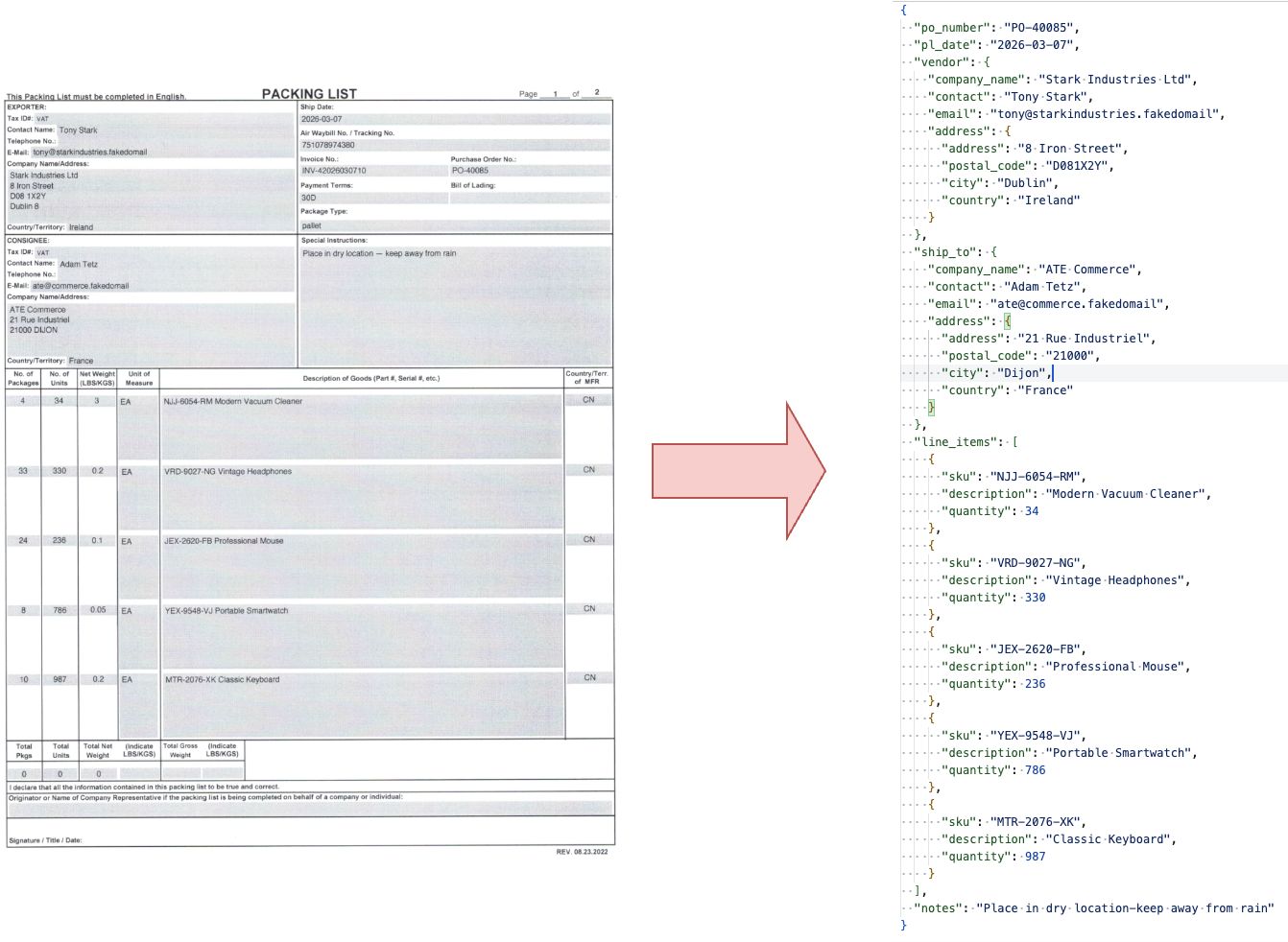
Armed with the extracted packing list data from part one I can now look at how this can be further used to eventually automate the cross referencing. Did you miss the first part? Don't worry, you can read it here
Let's unpack this a bit (pun intended!). I can now reliably extract the data of the scanned PDFs to markdown files but those files have a different layout and content depending on the PDF format. And the last thing I want to do is build something that contains logic tied to an individual format. Like mentioned in the previous part, this is likely to break when the format changes and needs extra maintenance.
Instead I want to leverage the power of a large language model (LLM) and offload the format changes to it. Why? The biggest reason being that LLMs have semantic understanding. It can understand the complete markdown file as a whole regardless of some minor issues in the layout. So I expect it to handle my requirements of handling format changes and fuzzy input errors.
Defining the output structure
Another thing LLMs are good at is providing structured output. And since I want to use the extracted document further downstream, be it for a human-in-the-loop system or for a draft in an ERP system, I'll first create a Canonical Data Model . A Canonical Data Model is a way of saying that we'll use a shared data model that is tied to the domain entity instead of a particular application format. It's a pattern used in messaging that really pays off when the number of applications grow. I like the idea of anything that I might use in the pipeline to produce or consume the same format.
My tool of choice for this is Pydantic. It has everything I need, from data validation to exporting json models if I decide to use the model outside of Python. This is what my model looks like:
import datetime
from typing import Optional

from pydantic import BaseModel


class Address(BaseModel):
    address: Optional[str]
    postal_code: Optional[str]
    city: Optional[str]
    country: Optional[str]


class Party(BaseModel):
    company_name: Optional[str]
    contact: Optional[str]
    email: Optional[str]
    address: Optional[Address]


class PackingLineItem(BaseModel):
    sku: str
    description: str
    quantity: int


class PackingList(BaseModel):
    po_number: str
    pl_date: datetime.date
    vendor: Party
    ship_to: Party
    line_items: list[PackingLineItem]
    notes: Optional[str]
I added the most important information and made the address information optional.
Working with a local LLM
Where to start? What model to choose? This is quite the rabbit hole on its own. The subject is absolutely flooded all over the internet. My desk research ended up being an approach of asking Claude / Gemini, googling, scanning a couple of subreddits like r/ollama and r/LocalLLaMA.
While searching for local LLM tooling that works on my Mac M1 Pro, I first landed on Ollama and then tinkered around with the examples in the docs. I find they have a simple API, CLI and Python library so I stuck with it.
Cherry picking models
Quickly I had a small test running and cherry picked some models. With Ollama it's very easy to pull a model using the CLI e.g. ollama pull llama3.1:latest and then reference it in Python using the library. I added the following function to my docling testfile:
import logging
import os
import time
from pathlib import Path

# docling imports

from ollama import Client
from pydantic import ValidationError

logger = logging.getLogger(__name__)

MODELS_BASE_PATH = "/my/path/to/DoclingModels"
OLLAMA_HOST = "http://localhost:11434"
MODEL = "llama3.1:latest"
SYSTEM_PROMPT = "Prompt is a markdown file from OCR. Return a single json file with data that complies with the schema."


def generate_model_response(client: Client, document: str) -> PackingList | None:
    response = client.generate(
        model=MODEL,
        system=SYSTEM_PROMPT,
        prompt=document,
        format=PackingList.model_json_schema(),
    )
    raw = response.response
    if not raw:
        logger.warning("Empty response from model")
        return None
    try:
        return PackingList.model_validate_json(raw)
    except ValidationError as exc:
        logger.error("Validation failed: %s", exc)
        return None


# docling pipeline function
...

def main():
    logging.basicConfig(level=logging.INFO)
    start_time = time.time()
    data_folder = Path(__file__).parent / "assets"
    source = data_folder / "PO-40085-fedex-300dpi.pdf"

    md = convert_pdf_to_markdown(source)

	client = Client(host=OLLAMA_HOST)
    model_response = generate_model_response(client, md)
    print(model_response.model_dump_json())

    end_time = time.time() - start_time
    logger.info(f"Document converted in {end_time:.2f} seconds.")


if __name__ == "__main__":
    main()
In the example above the Ollama Client is used with the following parameters:
- model - the model I want to use
- system - my system prompt
- prompt - the markdown file to parse
- format - The output format I want to enforce. In this case the JSON schema of my PackingList model.
The return PackingList.model_validate_json(raw) is there to parse the LLM output to my model and validate it. If this fails then I want it logged and None returned.
And it produced the following json in around 39 seconds:
{
  "po_number": "PO-40085",
  "pl_date": "2026-03-07",
  "vendor": {
    "company_name": "Stark Industries Ltd",
    "contact": "Tony Stark",
    "email": "tony@starkindustries.fakedomail",
    "address": {
      "address": "8 Iron Street",
      "postal_code": "D081X2Y",
      "city": "Dublin 8",
      "country": "Ireland"
    }
  },
  "ship_to": {
    "company_name": "ATE Commerce",
    "contact": "Adam Tetz",
    "email": "ate@commerce.fakedomail",
    "address": {
      "address": "21 Rue Industriel",
      "postal_code": "21000 DIJON",
      "city": "",
      "country": "France"
    }
  },
  "line_items": [
    {
      "sku": "NJJ-6054-RM Modern Vacuum Cleaner",
      "description": "Modern Vacuum Cleaner",
      "quantity": 34
    },
    {
      "sku": "VRD-9027-NG Vintage Headphones",
      "description": "Vintage Headphones",
      "quantity": 330
    },
    {
      "sku": "JEX-2620-FB Professional Mouse",
      "description": "Professional Mouse",
      "quantity": 236
    },
    {
      "sku": "YEX-9548-VJ Portable Smartwatch",
      "description": "Portable Smartwatch",
      "quantity": 786
    },
    {
      "sku": "MTR-2076-XK Classic Keyboard",
      "description": "Classic Keyboard",
      "quantity": 987
    },
    {
      "sku": "RYD-4918-Hil Deluxe Jacket",
      "description": "Deluxe Jacket",
      "quantity": 940
    }
  ],
  "notes": "Place in dry location - keep away from rain."
}
Not that bad at all! But also not good enough. My SKU contained an item description and my shipping address was missing a city because it got attached to postal code.
Fuelled by enthusiasm I went on fine-tuning the prompt a bit more and swapping out the models. The results varied, some validation errors and some missing data. I found mistral-small to produce the best output but it also took around 100 seconds to complete:
...
MODEL = "mistral-small:latest"
SYSTEM_PROMPT = """
You are a data mapping specialist. Your single job is to read messy, raw OCR text in Markdown format and normalize it into the requested structure.

Apply these transformation rules to the data mapping:

1. LINE ITEM AGGREGATION: Look across the entire document. If you find multiple separate tables or fragmented data aggregate and merge them into a single, flat list.
2. SKU ISOLATION: Explicitly split SKUs from their text descriptions. If the OCR has bound them together (e.g., 'A109-Blue Widget' or 'Widget Blue (A109)'), strip out the code and map it strictly to the SKU field, leaving only the clean name in the description field.
3. GEOGRAPHIC SPLITTING: Look at address rows. Parse and extract the city/place name from the numerical postal or ZIP code. Do not leave them combined in a single string.
4. OCR RESILIENCE: Contextually heal obvious typos caused by character misreads (e.g., if a serial code contains an 'l' instead of a '1' in a numeric column, or broken table markdown pipes, fix it automatically during mapping)."""
...
resulting in:
{
  "po_number": "PO-40085",
  "pl_date": "2026-03-07",
  "vendor": {
    "company_name": "Stark Industries Ltd",
    "contact": "Tony Stark",
    "email": "tony@starkindustries.fakedomail",
    "address": {
      "address": "8 Iron Street",
      "postal_code": "D081X2Y",
      "city": "Dublin 8",
      "country": "Ireland"
    }
  },
  "ship_to": {
    "company_name": "ATE Commerce",
    "contact": "Adam Tetz",
    "email": "ate@commerce.fakedomail",
    "address": {
      "address": "21 Rue Industriel",
      "postal_code": "21000",
      "city": "DIJON",
      "country": "France"
    }
  },
  "line_items": [
    {
      "sku": "NJJ-6054-RM",
      "description": "Modern Vacuum Cleaner",
      "quantity": 34
    },
    {
      "sku": "VRD-9027-NG",
      "description": "Vintage Headphones",
      "quantity": 330
    },
    {
      "sku": "JEX-2620-FB",
      "description": "Professional Mouse",
      "quantity": 236
    },
    {
      "sku": "YEX-9548-VJ",
      "description": "Portable Smartwatch",
      "quantity": 786
    },
    {
      "sku": "MTR-2076-XK",
      "description": "Classic Keyboard",
      "quantity": 987
    },
    { "sku": "RYD-4918-Hil", "description": "Deluxe Jacket", "quantity": 940 }
  ],
  "notes": "Place in dry location-keep away from rain"
}
Nearly perfect! The only mistake in the output was the misread SKU that was already in the markdown.
Missing something more systematic
Then it dawned on me that I had gotten a bit distracted by my shiny new toy and wasn't really being systematic. I had found something that worked. But was there more? Surely there is some research available on this subject?
So I went on searching for relevant work on google scholar and I found a very interesting article describing a benchmark called LLMStructBench for evaluating LLMs on extracting structured data. While this research focused on extracting data from text like e-mails or service requests, I still found some findings valuable and applicable to my use case:
- Prompting strategy weighs more than the model size. The size of the model helps in value accuracy, but from a certain point the gains become marginal.
- The best performing prompting strategies include a JSON schema and JSON example in the system prompt.
- Enforcing the format is the safest choice for ensuring a valid output structure but increases the risk of incorrect values when the model can't find the data.
Let's put that into practice!
I first defined an example json and then referenced it as an example in the system prompt:
PL_EXAMPLE = {
    "po_number": "PO-00001",
    "pl_date": "2026-01-15",
    "vendor": {
        "company_name": "Supplies Co.",
        "contact": "Jane Smith",
        "email": "jane.smith@supplies.example",
        "address": {
            "address": "123 Commerce Ave",
            "postal_code": "10001",
            "city": "New York",
            "country": "United States",
        },
    },
    "ship_to": {
        "company_name": "Global Retail Inc.",
        "contact": "John Doe",
        "email": "john.doe@globalretail.example",
        "address": {
            "address": "456 Distribution Blvd",
            "postal_code": "75001",
            "city": "Paris",
            "country": "France",
        },
    },
    "line_items": [
        {"sku": "ABC-1234-XX", "description": "Sample Product A", "quantity": 100},
        {"sku": "DEF-5678-YY", "description": "Sample Product B", "quantity": 250},
        {"sku": "GHI-9012-ZZ", "description": "Sample Product C", "quantity": 50},
    ],
    "notes": "Handle with care. Store in a cool, dry place.",
}


....


SYSTEM_PROMPT_1 = """
You are a data mapping specialist. Your single job is to read messy, raw OCR text in Markdown format and normalize it into the requested structure.

Apply these transformation rules to the data mapping in the order below:

1. LINE ITEM AGGREGATION: Look across the entire document. If you find multiple separate tables or fragmented data aggregate and merge them into a single, flat list.
2. SKU ISOLATION: Explicitly split SKUs from their text descriptions. If the OCR has bound them together (e.g., 'A109-Blue Widget' or 'Widget Blue (A109)'), strip out the code and map it strictly to the SKU field, leaving only the clean name in the description field.
3. GEOGRAPHIC SPLITTING: Look at address rows. Parse and extract the city/place name from the numerical postal or ZIP code. Do not leave them combined in a single string.

You must respond in JSON. Example output:
{
    "po_number": "PO-00001",
    "pl_date": "2026-01-15",
    "vendor": {
        "company_name": "Supplies Co.",

....
I also dropped the OCR resilience instruction in the prompt because I think this might work better in the context of cross referencing. My train of thought here is that having the data that it's being cross referenced to might be a better context for an agent to fix an OCR issue over defining all possible edge cases with the risk of still be misinterpreted.
I'm going to make an assumption here that my input data is a bit cleaner to work with. My input is more concise and has less context than a human request like in the study. I also care more about having the valid output structure. Having the same structure all the time makes it easier for me to use it downstream to crosscheck the data. If the data cannot be found, I'd rather have a 95% correct output that needs a review than an object that cannot be parsed. So I chose to keep enforcing the format.
Selecting and testing models
For model selection I looked at the leaderboard table in the study and checked which would run on my system with https://www.canirun.ai/. Luckily for me it confirmed that I could run the 3rd best in the leaderboard: gemma 3:12b!
The following tests finished in about 60-80 seconds against both document formats from part one. But it mapped the number of packages as SKU quantity for the Stark format.
....
  "line_items": [
    {
      "sku": "NJJ-6054-RM",
      "description": "Modern Vacuum Cleaner",
      "quantity": 4 <- should have been 34
    },
    {
      "sku": "VRD-9027-NG",
      "description": "Vintage Headphones",
      "quantity": 33 <- should have been 330
    },
....
This was easily fixed by adding another rule to my system prompt file: 2. Map the quantity to the number of individual product units. Ignore packaging quantities.
Out of curiosity I tried another newer smaller model from the same familygemma4:e4b and that returned the same quality in 30-40 seconds depending on my template!
What about accidentally swapped columns? These got handled without adding anything to the system prompts. For example the lines below:
....
| OKE-4827-OW Professional Speaker | 44 | piece |
| Ergonomic Water Bottle PVP-9315-JD | 729 | piece |
| BAM-1980-IW Ergonomic Backpack | 287 | piece |
....
Resulted in these lines:
{
  "sku": "OKE-4827-OW",
  "description": "Professional Speaker",
  "quantity": 44
},
{
  "sku": "PVP-9315-JD",
  "description": "Ergonomic Water Bottle",
  "quantity": 729
},
{
  "sku": "BAM-1980-IW",
  "description": "Ergonomic Backpack",
  "quantity": 287
}
Great! This means that the markdown OCR data gets reliably parsed to my canonical data model. Out of even more curiosity I tested out the llama3.1 model that I disregarded earlier and this now also gave very similar results. But also introduced a hallucination: "notes": "Do not stack other packages on top. Handle with care." Nowhere in the document does it say: handle with care!
This only confirms that we need some form of downstream validation!
What about consistency?
It's no secret that AI models are non deterministic by default. Meaning that the same input does not always guarantee the same output. This made me curious to find out what the results would be if I ran the same document and prompt for 10 times (per format).
The first attempt had the best output but the differences between other tests were not deal breaking:
- One added a "SHIPPER NOTE:" prefix to the note field.
- One added .com after the .fakedomail and removed the ending period from the note.
- One removed the ending period from the note. After the 4th test I was getting identical responses up to 10 attempts. I assume this is some default KV caching on the Ollama side but I did not look into it further.
While these results are accurate enough for me, it didn't sit well that the same input did not result in the same output. I found an interesting Github issue explaining that I could make the responses more deterministic by changing the temperature to 0.
Up until that point I was working with each model's defaults:
ollama show --parameters gemma4:latest
top_p                          0.95
temperature                    1
top_k                          64
Let's try it out! Setting the temperature is quite easy by adding options={"temperature": 0}, to the generate_model_response I created earlier.
....
    response = client.generate(
        model=MODEL,
        system=SYSTEM_PROMPT_1,
        prompt=document,
        options={"temperature": 0},
        format=PackingList.model_json_schema(),
    )
....
After adding this I got the same response for all tests. Interestingly for the ACME format this meant that part of the misread SKU was now attached to the description:
{"sku":"RYD-4918-","description":"Hil Deluxe Jacket","quantity":940}
Zooming out
Alright! For this use case I can safely say that a LLM can be used to produce structured and fairly reliable data from docling's OCR data. Along the way I learned that it's relatively simple to work with a local LLM and optimise its results. The top things I learned:
- I only needed a 8B parameter model on my machine to get good results
- The best prompting strategy is a combination of enforcing the format, adding examples and making sure the rules in the system prompt are as unambiguous as possible.
- Setting the temperature to 0 makes responses more deterministic.
The whole pipeline now runs at about 30-45 seconds depending on the format and number of pages. Half of that time is used by docling!
Now that I have the right elements for a working proof of concept it's time to look at the bigger picture and see how it can be used in production. Let's explore this in the next part!